Evaluating Mexico Elements 3D SVG for Cultural Crafting Projects
When planning a project that celebrates Mexican heritage, from Cinco de Mayo festivities to Day of the Dead memorials, the choice of digital assets plays a pivotal role in the final outcome. The Mexico Elements 3D SVG collection represents a specific category of design resources tailored for crafters who want depth and dimension in their work. Unlike standard flat vector files, these designs are engineered to create layered effects, offering a visual richness that single-layer cuts often lack. Understanding what this format entails, how it compares to traditional 2D options, and where it fits within your workflow is essential for making an informed decision before downloading or purchasing.
Defining the 3D SVG Format and Its Distinctive Features
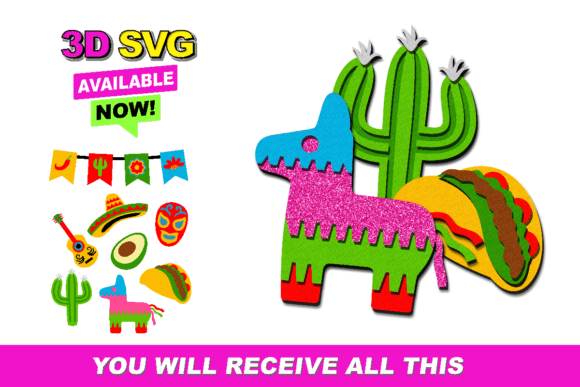
At its core, a 3D SVG file for cutting machines is not a three-dimensional model in the sense of CAD software used for engineering. Instead, it is a strategic assembly of multiple two-dimensional layers. When you download the Mexico Elements 3D SVG, you are receiving a zipped folder containing several SVG files that correspond to different depths of a single image. For example, a sombrero design might include separate layers for the brim, the crown, the decorative band, and shadow elements.
The distinct advantage of this approach lies in the physical texture it adds to paper crafts, cardstock projects, and vinyl applications. By stacking these layers, often using foam adhesive tabs between them, crafters achieve a pop-up effect that catches light and creates shadows naturally. This is particularly effective for cultural motifs like sugar skulls, marigolds, and piñatas, where intricate details benefit from separation. The collection is optimized for popular software ecosystems, ensuring compatibility with Silhouette Studio and Cricut Design Space. However, users operating other types of machines must verify their software's ability to handle multiple layered SVG imports, as workflow efficiency depends heavily on this compatibility.
Comparative Analysis: 3D Layered Files vs. Standard 2D Vectors
When evaluating design resources, it is helpful to compare the utility of 3D layered collections against standard 2D vector files. Both have their place, but they serve different aesthetic and functional goals.
- Visual Depth: Standard 2D SVGs provide a flat, clean look ideal for iron-on transfers or simple stickers. In contrast, the Mexico Elements 3D SVG offers dimensional complexity. If your goal is a cake topper that stands out on a table or a wall decoration that casts shadows, the 3D option is superior.
- Material Usage: A significant tradeoff is material consumption. A single 2D design requires one piece of cardstock or vinyl. A 3D version may require three to five separate pieces for the same image. This increases the cost per unit and the time spent weeding and positioning.
- Assembly Time: Flat files are generally "cut and apply." Layered files require assembly. You must align each layer precisely. For beginners, this can be daunting, whereas experienced crafters often view the assembly process as a meditative and rewarding part of the creation.
- Versatility: While 3D files are specialized for dimensional projects, they can technically be used as flat images by simply ignoring the extra layers. However, the reverse is not true; you cannot generate accurate 3D layers from a single flat SVG without significant redesign work.
For users deciding between these formats, the choice often comes down to the intended application. If you are producing high-volume t-shirts where speed and flatness are priorities, a standard 2D vector is likely the more efficient resource. Conversely, for boutique items like greeting cards, party favors, or display pieces where perceived value is heightened by craftsmanship, the layered approach of the Mexico Elements 3D SVG provides a competitive edge.
Practical Applications and Best-Fit Scenarios
The versatility of this collection allows it to span various crafting mediums, though success varies by material. One of the most popular uses is in creating cake toppers. The rigidity of cardstock combined with the layered depth makes these designs stable enough to stand upright on frosting while looking elegant. The vibrant colors associated with Mexican culture—bright pinks, oranges, and blues—pop effectively when layered.
Another strong use case is in sticker production. While traditional stickers are flat, "puffy" stickers made from layered vinyl or cardstock offer a tactile experience that customers often prefer. For printed shirts, the application is more nuanced. While you can cut layered heat transfer vinyl (HTV), aligning multiple layers on fabric is challenging and may result in a stiff feel if too many layers are stacked. In this scenario, users might choose to use only the base layer for printing or select specific elements from the Mexico Elements 3D SVG pack that work well as single-color overlays.
Birthday celebrations and cultural festivals also benefit from these assets. Think of banner flags, cupcake wrappers, or centerpiece decorations. The ability to mix and match elements—such as combining a cactus layer with a fiesta hat layer—allows for custom compositions that feel unique rather than mass-produced.
Technical Considerations and Software Compatibility
Before integrating these files into your workflow, technical readiness is crucial. The download typically includes SVG files compressed in a zipped folder. Upon extraction, users will find individual files for each layer.
If you are using Silhouette Studio or Cricut Design Space, the import process is generally seamless. These platforms recognize SVG layers automatically, allowing you to manipulate, resize, and color-code each segment individually. This feature is vital for ensuring that the shadow layers are slightly offset correctly to create the 3D illusion without obscuring the details of the top layer.
However, if you are utilizing alternative cutting machines or older software versions, caution is advised. Some systems may import the SVG as a single grouped object, requiring you to manually ungroup and separate the paths. Others might not support the SVG format at all, necessitating a conversion to DXF or PNG, which could compromise the scalability and editability of the vectors. Always ensure your machine's firmware and software are updated to handle complex multi-layer imports efficiently.
Limitations and Decision Factors
While the Mexico Elements 3D SVG collection offers significant creative potential, it is not a universal solution for every project. Crafters should be aware of specific limitations:
- Scale Constraints: Intricate 3D layers can be difficult to weed and assemble if the final design is very small. Fine details in the inner layers may get lost or tear easily if scaled down below a certain threshold.
- Learning Curve: For those new to layering, understanding how to offset layers for shadows versus alignment for solid colors takes practice. Mistakes in alignment can ruin the 3D effect.
- Time Investment: As noted, the assembly time is significantly higher. If you are working under a tight deadline for a large order, the time required to stack and glue dozens of layered elements might make this format impractical compared to single-cut alternatives.
Ultimately, the decision to use this resource should hinge on your project goals. If you prioritize speed and simplicity, standard flat vectors remain the industry standard. But if your objective is to create heirloom-quality items, distinctive party decor, or products that command a higher price point due to their artisanal appearance, the investment in learning the layered workflow is worthwhile.
In conclusion, the Mexico Elements 3D SVG collection serves as a robust tool for crafters looking to add dimension to their cultural projects. By understanding the tradeoffs between material usage, assembly time, and visual impact, you can determine whether this format aligns with your specific needs. Whether you are designing for a personal celebration or a small business inventory, leveraging the depth of these layered files can elevate the quality of your output, provided you have the patience and tools to execute the assembly with precision.